v0.1.1 · Early access Securely made in India
A clipboard manager
for your Mac, your phone,
or both at once.
Each app works on its own. Pair them over Bluetooth and your clipboard hops between devices — end-to-end encrypted, no cloud, no account.
- Round-trip
- < 500 ms
- Range
- 10–15 m
- Network
- None
How it feels
Maccy meets AirDrop
A clipboard manager like Maccy on each device — with a private Bluetooth bridge between them. End-to-end encrypted, no cloud.
Copied on Mac · Received on phone · Under 500 ms
Principles
Six commitments
The product is small on purpose. These are the rules that keep it small and keep it yours.
01
Standalone on Mac
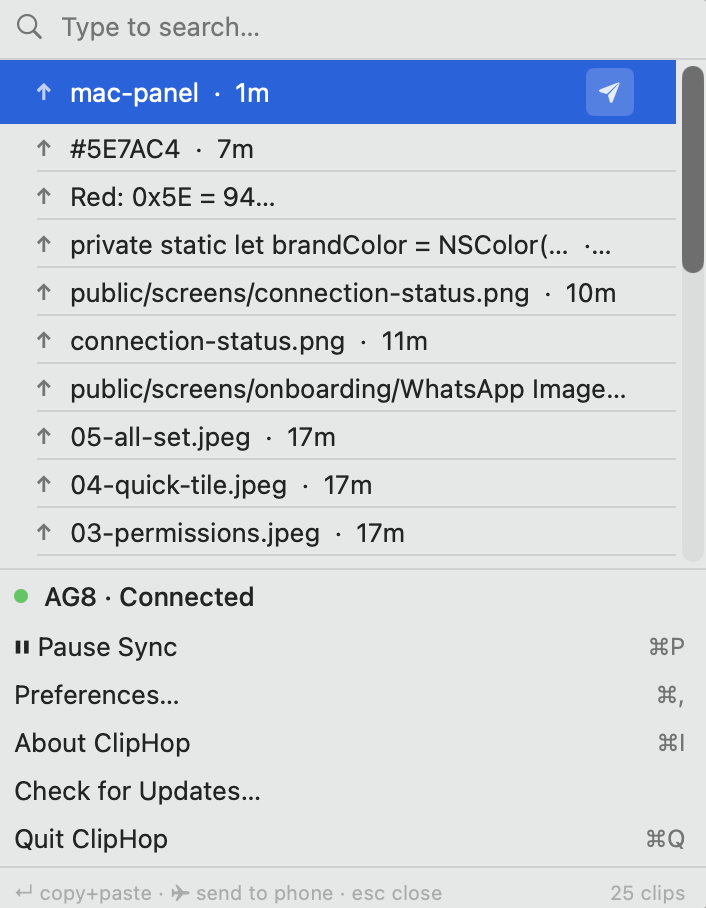
A full-featured clipboard history manager in your menu bar. Search, pin, paste. No phone required.
02
Standalone on Android
A full-featured clipboard history manager in your pocket. No Mac required, no account, no cloud.
03
Sync when you want
Pair the two over Bluetooth when you want them in lockstep. Each app is complete on its own.
04
Nothing leaves your devices
No internet, no cloud, no account. Your clipboard stays between the hardware you own.
05
Used by the person who built it
Shipped every week. Bugs go to the builder’s phone. Feature requests reply the same day.
06
🇮🇳 Securely Made in India
Designed, written, and shipped from India. Independent, not venture-backed, not for sale.
Standalone mode
Each app is complete on its own.
No Mac? Use ClipHop as a standalone clipboard manager on Android. No Android? Use it as a standalone clipboard manager on Mac. Connect the two only when you want them synced.
Mac, on its own
No phone required
- → Menu-bar clipboard history with search
- → Pin items so they survive clears
- → Global hotkey for the history panel
- → Return to copy, then auto-paste back into the previous app
Android, on its own
No Mac required
- → Full clipboard history, biometric-locked
- → Paste previews masked in other apps’ keyboards (Android 13+)
- → Quick Settings tile for one-tap push
- → Android Share sheet target
- → Works while the phone is locked
Send from Android
Four ways to hop a clip to Mac
Pick whichever fits your flow. All four end up as the same AES-256-GCM payload over Bluetooth.
01
Share sheet
From any app. Tap Share → ClipHop and the content hops to your Mac.
02
Quick Settings tile
Swipe down from the status bar, tap the ClipHop tile, your clipboard is on Mac.
03
From the app
Open ClipHop, tap any history item, hit Send. Useful for re-sending an older clip.
04
Automated
Copy anywhere, it flows to Mac on its own. No taps. Works best on stock Android — OEM skins may kill the listener.
Themes
Two themes on Android
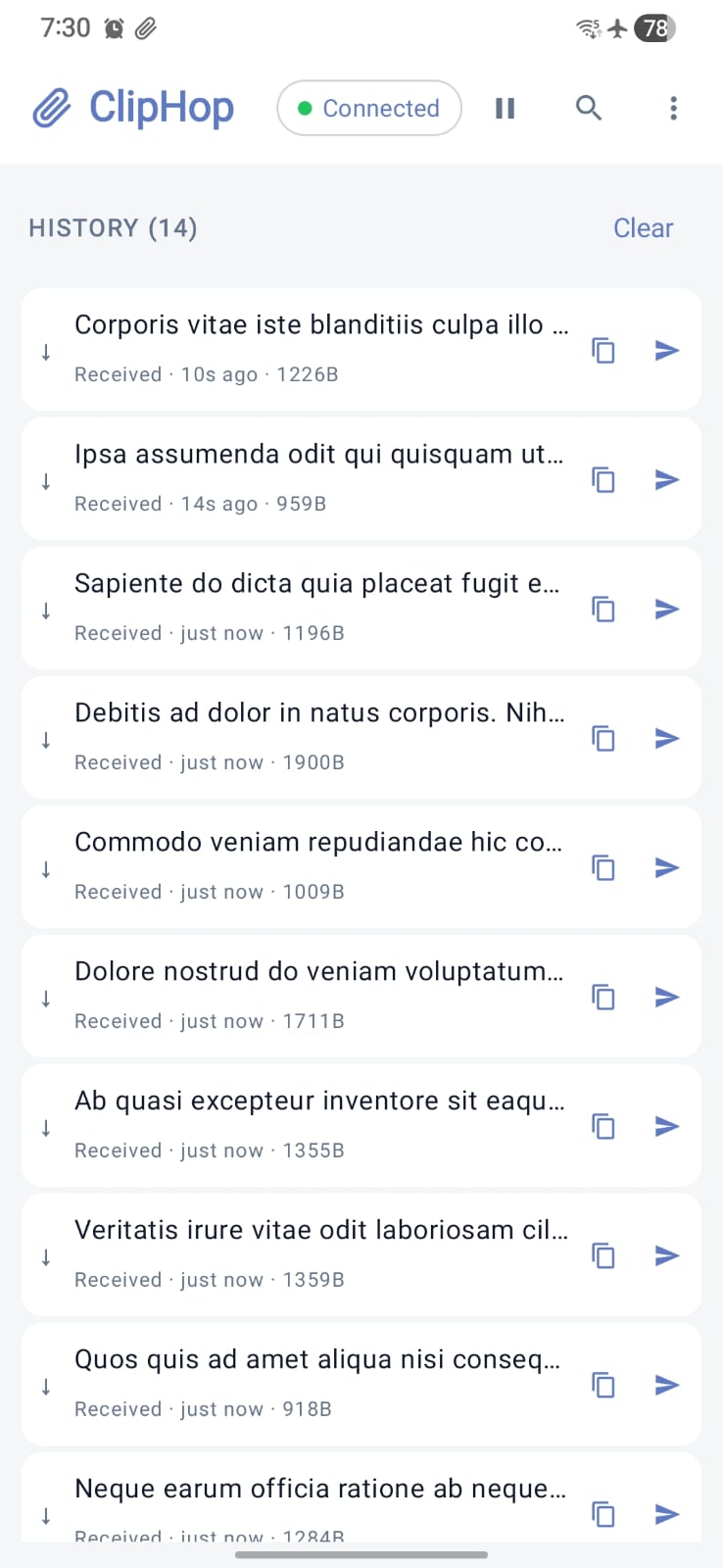
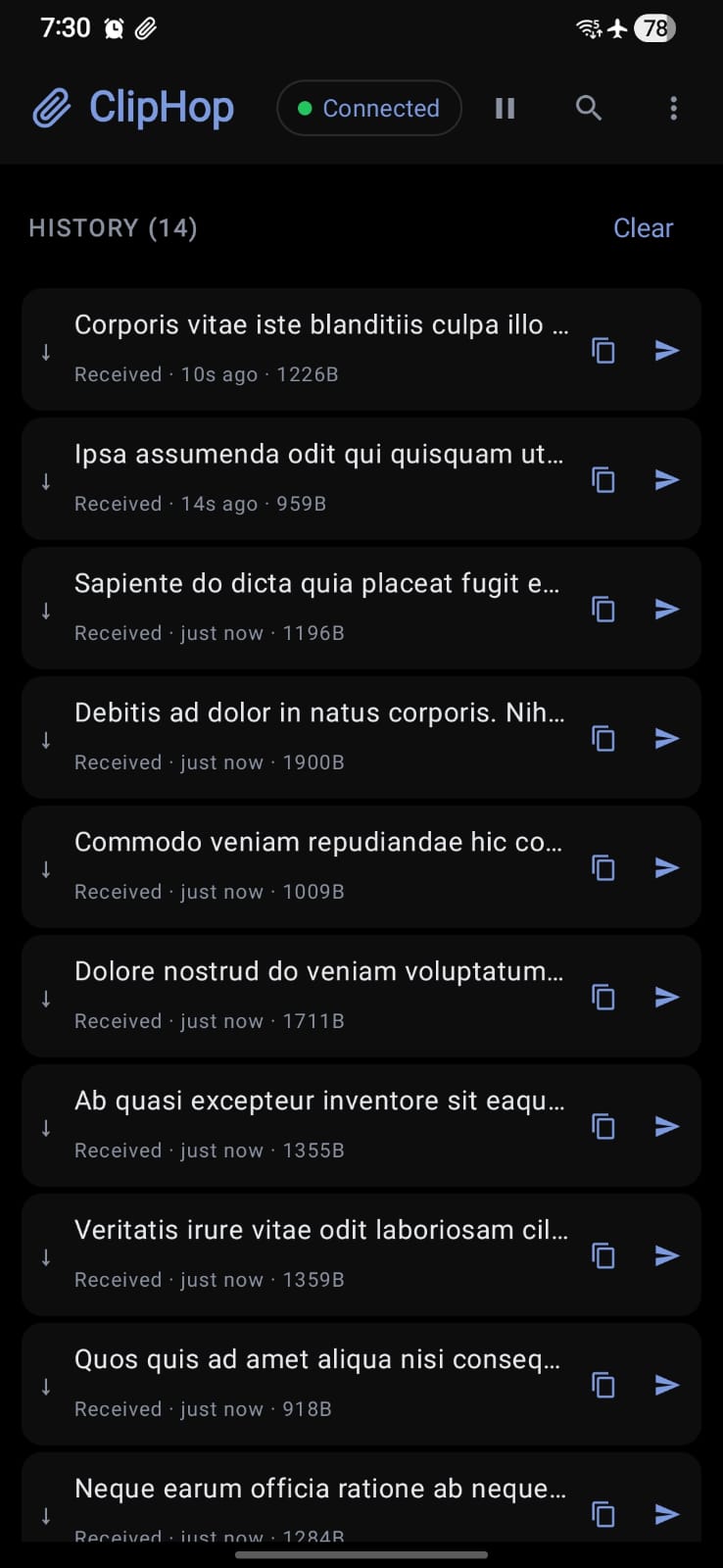
The Android app ships both a light and a dark theme — follow your system, or lock a favourite. The Mac menu-bar app is native AppKit, so it follows your macOS appearance the way every other menu-bar app does.
- https://cliphop.org now
- 4A-9F-E1 2m
- npm run dev 12m
- Hello, Mac. 1h
- https://cliphop.org now
- 4A-9F-E1 2m
- npm run dev 12m
- Hello, Mac. 1h
The Mac app inherits macOS appearance
Screens
The apps, as they actually are
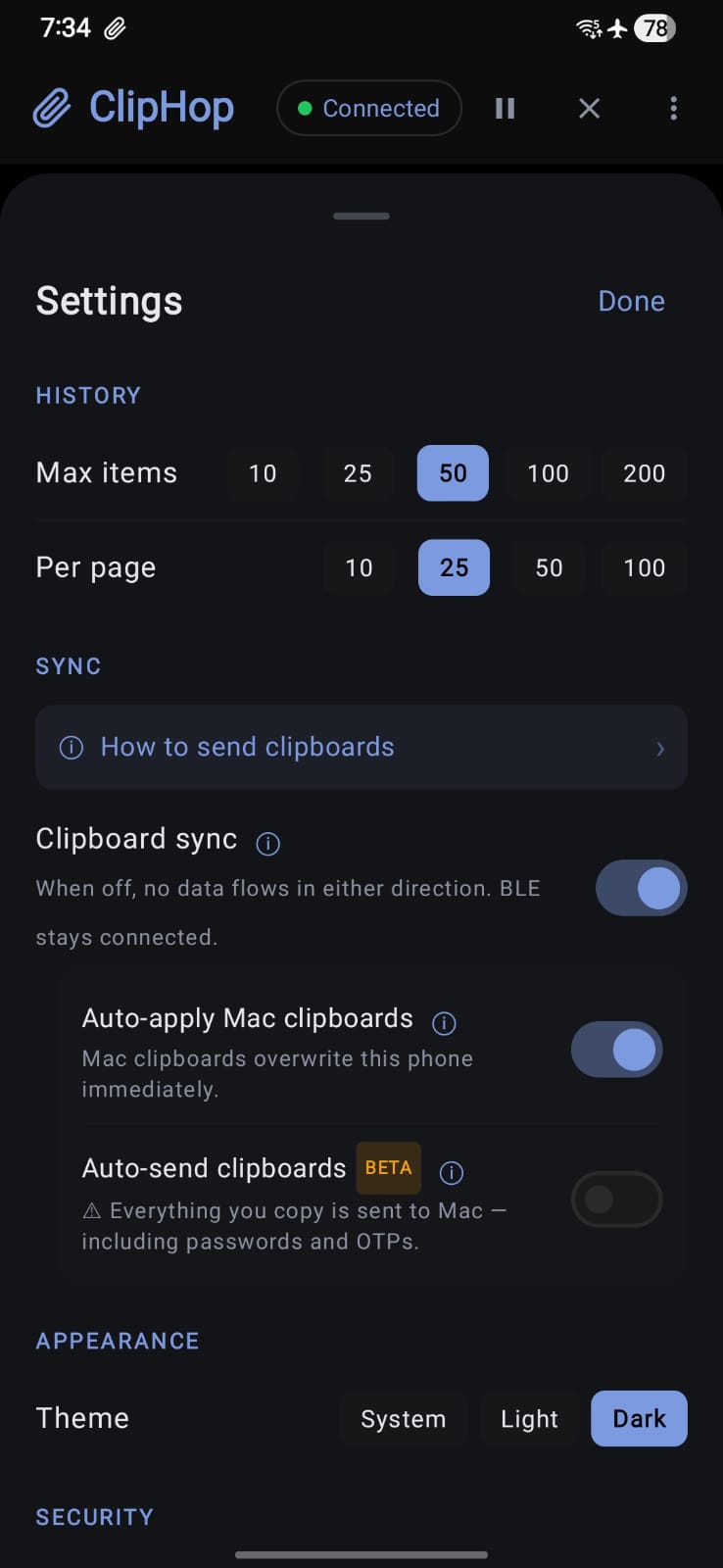
No mockups — v0.1.1 on real hardware. Yes, the airplane icon on the Android shots is intentional.
Features
Honest defaults
01
Copy on one, paste on the other
Sub-500 ms round-trip over Bluetooth LE with L2CAP connection-oriented channels where supported, GATT fallback elsewhere.
02
Encrypted end to end
AES-256-GCM session keys derived from an X25519 ECDH handshake and signed by Ed25519 identity keys in the Keychain / Keystore.
03
Verifiable pairing
A short identity fingerprint is shown on both devices. Inspect it at pair time or any time from Paired Devices.
04
Clipboard privacy
Local-only history on each device. Sending is manual — you pick each clip to share, so OTPs and passwords stay put unless you tap send.
05
Auto-apply on arrival
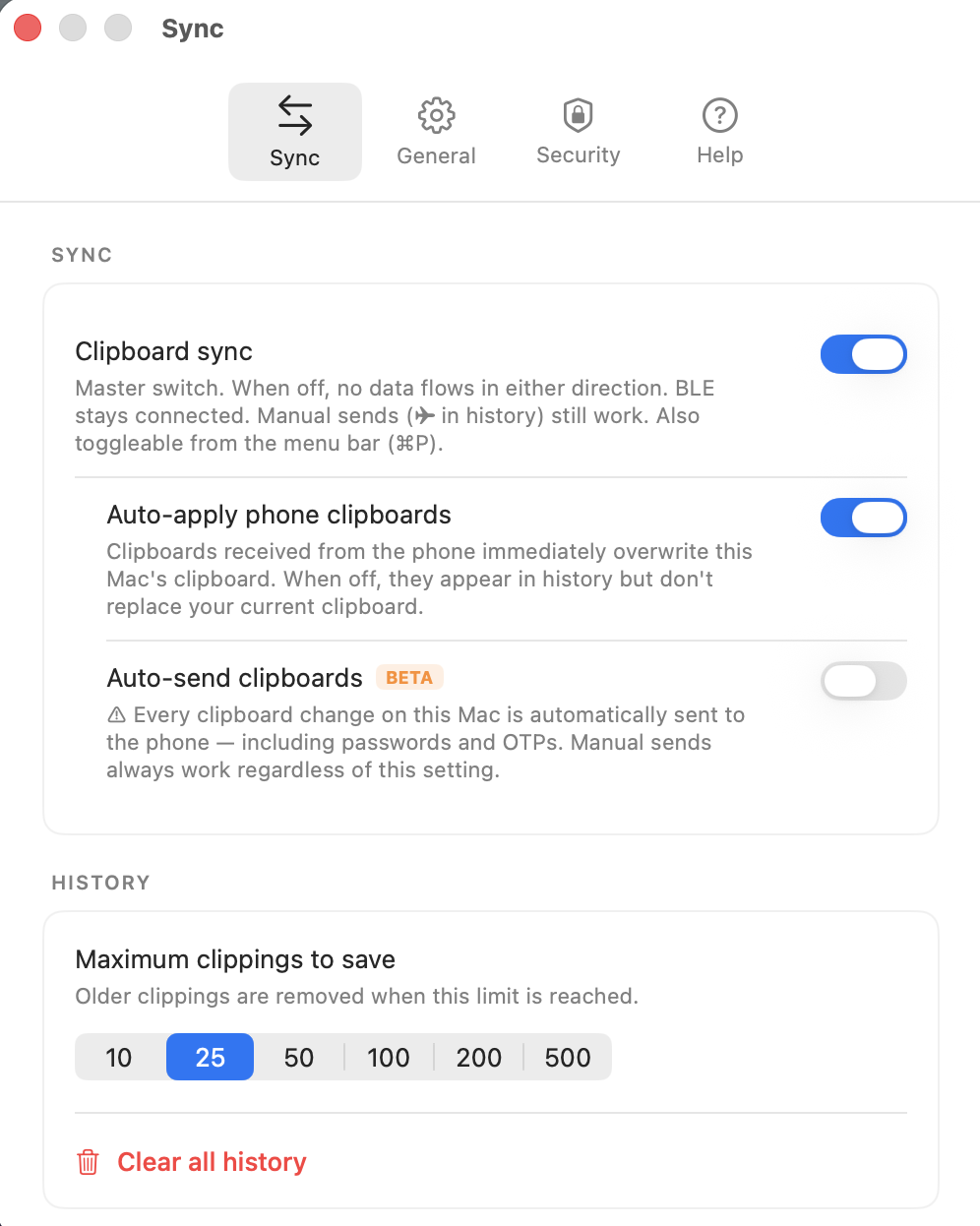
Received clips immediately become your local clipboard, ready to paste with ⌘V or long-press as usual. Toggle it off and clips sit quietly in history until you pick one.
06
Minimal permissions
Bluetooth on both platforms. Optional Accessibility on Mac for auto-paste. No contacts, no location, no analytics.
07
Biometric lock
Fingerprint, face, or PIN to open ClipHop on Android. Re-locks 30 seconds after you leave the app, so quick access stays quick without leaving history exposed.
08
Pause whenever, from either device
Flip Clipboard sync off from the Mac menu bar (⌘P) or the Android top bar. Data flow stops, the Bluetooth link stays up, and manual sends still go through when you pick a clip.
09
One-tap pause from your phone’s notification
The Android persistent notification has a Pause / Resume action built in — control the Bluetooth link without unlocking the phone or opening the app.
10
Works offline, works in flight mode
Bluetooth is the only radio involved. No WiFi, no cell signal, no captive portal — ClipHop works on a plane, in a basement, or on a network you don’t trust.
Compare
How we stack up
| ClipHop | Apple Universal Clipboard | KDE Connect | |
|---|---|---|---|
| Android to Mac | Yes | Apple only | Yes |
| Works without any network | Yes | No (iCloud) | No (LAN) |
| End-to-end encrypted | AES-256-GCM | Via iCloud | TLS transport |
| Identity fingerprint | Yes | No | No |
| Standalone on each platform | Yes | N/A | No |
| Price | Free | Apple hardware | Free |
FAQ
The common ones
Browse all 30 — organized by Mac, Android, security, pairing, troubleshooting.
Is ClipHop free?
Which macOS and Android versions are supported?
Does my clipboard ever leave my two devices?
How is ClipHop’s end-to-end encryption implemented?
What permissions does ClipHop need?
What’s ClipHop’s Bluetooth range?
Two apps. One clipboard. No cloud.
Install one or both — nothing is locked behind the other.